
What is Locksmith Software?
Locksmith software is a specialized category of Field Service Management (FSM) technology designed explicitly for the security trade. Unlike generic tools used by plumbers or electricians, true locksmith software handles sensitive data workflows—such as secure key code storage, automotive details, and master key system charts—while maintaining strict audit trails.
For a modern locksmith business, the software serves as the central operating system, connecting dispatchers in the office with technicians in the field via mobile apps.
What Is the Best Locksmith Software in 2026?
Choosing the right platform depends on your business model. In 2026, the market is divided between generalist FSM giants and specialist locksmith platforms.
Generalist FSM Tools
(e.g., Housecall Pro, Jobber, ServiceM8, ServiceTitan, Service Fusion)
- ✓ Great for general scheduling
- ✓ Robust marketing features
- ✗ No key code storage
- ✗ No specialized automotive fields
Specialist Locksmith Platforms
(e.g., Unlokt)
- ✓ Secure data fields for key codes
- ✓ ID/Registration photo upload
- ✓ Technician-focused mobile apps
- ✓ Inventory for blanks & fobs
The Locksmith Software Ecosystem
Running a modern security business requires multiple specialized components working in sync. Rather than forcing a single platform to handle everything, a high-performing tech stack connects dedicated tools through secure integrations.
A typical locksmith business coordinates field service operations, key code math databases, and financial ledger syncing to minimize administrative overhead.
Scheduling, Dispatch & CRM
Coordinates calendars, technician routes, customer records, and active dispatch mapping.
Key-Code & Reference Tools
Provides physical bitting cuts lookup from vehicle VINs or serial stamps.
Accounting & Ledgers
Manages business-wide tax records, profit/loss sheets, and Net-30 invoice reconciliation.
Payment Processing
Collects on-site credit card swipes, mobile taps, or card-on-file billing tokens.
Routing & Navigation
Provides turn-by-turn driving directions and real-time highway traffic monitoring.
Fleet & Vehicle Tracking
Monitors vehicle safety speed, fuel usage, and active GPS truck positions.
Access Control Design
Maintains hardware door schedules, master key charts, and commercial blueprints.
Marketing & Reputation
Builds public visibility on Google Local Services and automates customer reviews.
Complementary Security Tools: Code Books vs. FSM
One common point of confusion is whether business management software replaces specialized security code databases. They serve entirely different purposes and are designed to complement one another, rather than replace each other.
Key-code databases (such as InstaCode Live or HPC CodeSource) calculate key bitting configurations. When an operator needs to cut a key for a specific lock cylinder or vehicle, they input the VIN or card series into the code-book software to lookup the exact mechanical cut dimensions (bitting cuts). FSM systems do not perform these key calculations, and Unlokt does not replace these established code-reference systems.
By contrast, an FSM platform handles general business operations: scheduling jobs, dispatching technicians, customer invoices, and record keeping. While some platforms allow logging the final key-code or bitting depths manually within job history files to bypass lookup charges on future visits, this data storage requires careful consideration:
- Access Controls & Permissions: Access to bitting codes and security photos should be locked down to the specific technician active on the work order, preventing unauthorized internal lookup.
- Encryption & Security Vaults: Any sensitive data must be encrypted at rest and in transit, and access attempts must be tracked in an immutable security audit log.
- Data Retention Policies: Security shops should configure policies to automatically purge customer identification and bitting records after a specific retention window.
- Legal & Compliance Standards: Storing key codes alongside customer PII (names/addresses) may trigger compliance rules under local state licensing boards or data privacy statutes. Operators must ensure compliance with security trade standards (such as ALOA rules and regional registry requirements).
Market Research: Why Locksmiths Replace Field Service Software
Based on our analysis of field service workflows and feedback from locksmiths migrating from generalist platforms, security-specific workflows are non-negotiable for growing companies.
| Operational Trigger | Common Complaint | Technical Root Cause |
|---|---|---|
| Lost Key Codes | "Tech couldn't find the bitting code." | Generic "Notes" fields are unstructured and insecure. |
| Inventory Drift | "Ran out of H75 blanks mid-job." | Inventory not deducted automatically upon invoice creation. |
| Double Entry | "I have to write down the VIN twice." | No dedicated vehicle fields in the dispatch system. |
Comparison: While platforms like Housecall Pro and Jobber excel at general scheduling for residential trades, they force locksmiths to use unsorted "custom fields" for critical security data. Unlokt treats key codes, vehicle details, and ID verification photos as first-class data types.
Locksmith Software Decision Framework by Business Model
Selecting software should be treated as a decision framework rather than a rigid prescription. The right choice depends on your specific business model, workflow complexity, B2B contract volume, and administrative capacity.
1. Solo or One-Van Operators
- Operational Priorities: Minimizing administrative overhead and speed of invoicing. Because operators handle the phones while driving, paperwork must be kept to a minimum.
- Capabilities That Matter: Rapid mobile estimates, card reader processing (e.g. Stripe or Square readers), and a searchable client record database to look up historical key codes.
- Capabilities That May Be Unnecessary: Multi-van dispatch boards, route zoning algorithms, and multi-tier user permission levels.
- Likely Implementation Burden: Low. Can be configured and running in under an hour.
- Common Purchasing Mistake: Buying a high-tier FSM platform designed for large service fleets, which adds unnecessary administrative fields and costs.
2. Growing Two-to-Nine-Technician Companies
- Operational Priorities: Fleet dispatch logistics and coordinating office dispatchers with field vans.
- Capabilities That Matter: Drag-and-drop scheduling calendars, GPS location mapping, and automated customer notifications (SMS alerts).
- Capabilities That May Be Unnecessary: Custom API integrations and multi-site corporate account portals.
- Likely Implementation Burden: Medium. Requires coordinating with technicians and training office dispatchers.
- Common Purchasing Mistake: Sticking with simple text-messaging groups and paper calendars for too long, which increases routing errors and causes billing delays.
3. Automotive-Specialist Shops
- Operational Priorities: Documenting vehicle specifications, key blanks, transponders, and compliance records.
- Capabilities That Matter: Dedicated fields for Year-Make-Model-VIN logging, owner authorization ID photo uploads, and mobile key blank inventory tracking.
- Capabilities That May Be Unnecessary: Door schedule software and B2B Net-30 contract billing configurations.
- Likely Implementation Burden: Medium. Requires cataloging transponder and blank SKU quantities.
- Common Purchasing Mistake: Choosing generalist software with unstructured notes fields, which leads to lost bitting codes and VIN documentation.
4. Commercial or Institutional Locksmiths
- Operational Priorities: Managing master key system records, door hardware schedules, and B2B client contracts.
- Capabilities That Matter: Corporate account hierarchy, master key bitting log databases, Net-30 invoicing, and PDF project submittals.
- Capabilities That May Be Unnecessary: Emergency on-call dispatch zoning and automated customer ETA maps.
- Likely Implementation Burden: High. Requires migrating large legacy master key systems and hardware logs.
- Common Purchasing Mistake: Opting for a residential-focused FSM app that cannot organize multiple properties under a single corporate parent account.
5. Larger Multi-Location Security Providers
- Operational Priorities: Financial audit consistency, multi-region dispatching, and secure user permissions.
- Capabilities That Matter: Granular role-based access permissions, ledger syncing with QuickBooks Online, and multi-site dispatcher routing.
- Capabilities That May Be Unnecessary: Standalone mobile payment apps that do not reconcile with the primary ledger.
- Likely Implementation Burden: High. Typically requires weeks of training, system testing, and database migration support.
- Common Purchasing Mistake: Rushing the integration with accounting ledgers (such as QuickBooks or Sage) without verifying tax rates and ledger maps first.
Essential Features of Locksmith Scheduling Software
To scale a locksmith business beyond a single van, software must handle complex logistics.
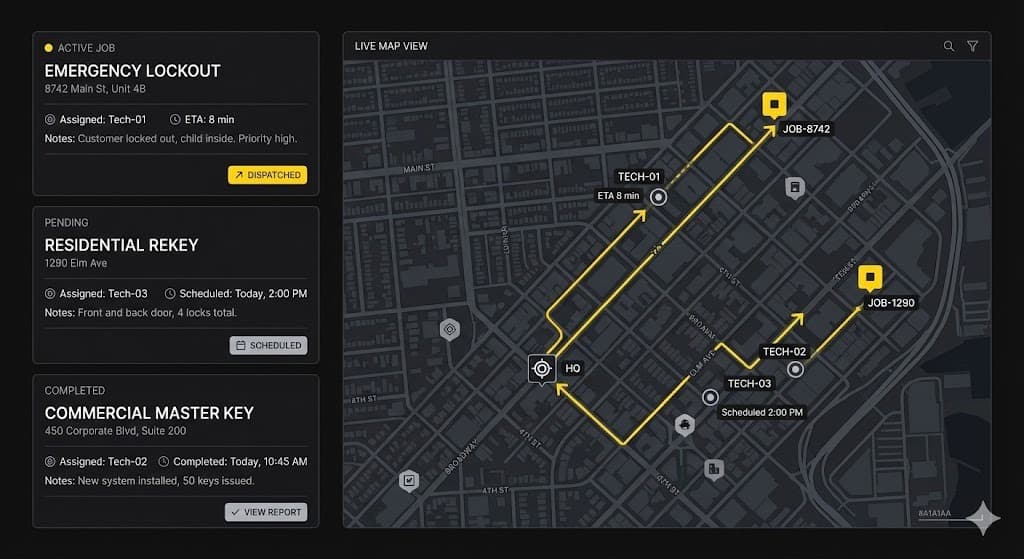
Illustrative Unlokt dispatch board and routing map (conceptual example only).
- Intelligent Dispatch & GPS Routing: Implementing robust locksmith scheduling software enables you to assign jobs based on technician proximity and skill set (e.g., sending an automotive specialist to a lockout). For an operational overview of managing dispatch priority queues and route planning, read our locksmith dispatch playbook.
- Mobile Invoicing & Payments: Generate professional invoices and accept credit cards on-site, ensuring transparent pricing that aligns with national locksmith cost expectations.
- Digital Work Orders & Audit Trails: Every interaction, from the initial call to the final signature, must be logged for liability protection.
See it in action
Unlokt combines dispatch, payments, and inventory in one app.
See how Unlokt implements thisThe Locksmith Dispatch & Field Workflow
A locksmith's daily operation consists of high-speed coordination. The workflow diagram below displays an example of how a specialized platform handles dispatching and security records.
Intake & Triage
Customer emergency logged. VIN, vehicle year, make, model captured.
Proximity Dispatch
Map view matches closest tech with correct blanks & fobs in truck stock.
Field Execution
Tech navigates. Uploads ID/reg photos and logs secure key code vault bitting.
Instant Closeout
Digital signature taken. Payment processed via Stripe; invoice synced to QB.
Fig 1. Labeled conceptual diagram of standard emergency dispatch and documentation sequence.
What Locksmiths Actually Say: Common Industry Frustrations
The observations below summarize recurring themes discussed by locksmith business owners across public industry forums and online communities. Individual experiences vary.
When looking at discussion boards, subreddits, and independent software review sites, several clear patterns emerge about what locksmiths love and hate about their software platforms:
- 1. Truck Inventory Drift
Locksmith vans carry thousands of dollars in tiny parts (key blanks, specialized transponder fobs, mortise cylinders, pins). A frequent community complaint is that generalist FSM apps are optimized for large-unit HVAC/plumbing jobs and do not manage the stock levels of these small parts, leading to trucks running out of key blanks mid-job.
- 2. Data Porting and Loss of Job History
Locksmiths heavily depend on historical bitting records and customer histories. Many operators report that switching software vendors was a major headache because custom fields containing vehicle VINs and security key codes failed to import cleanly into the new system.
- 3. Lack of Locksmith-Specific Workflows
For general contracting work, scheduling and simple dispatching are sufficient. But for locksmith jobs, technicians need specialized input fields (Year, Make, Model, VIN, Key Code) and security features (such as ID photo uploads and restricted keyway approvals). General FSM systems often require technicians to crowd all this data into a single, unorganized notes field.
- 4. Unexpected Costs and "Seat Upgrades"
Many buyers choose a system based on its advertised starter tier, only to find that vital features (like QuickBooks synchronization or automated customer SMS alerts) are gated behind expensive upgrade tiers. Additionally, per-seat fees for dispatchers and mobile technicians can scale up overhead costs significantly.
at the same time, locksmiths frequently praise competitors for their specific operational advantages. For example, Jobber is routinely commended for its simple scheduling, clean user interface, and solid customer review automation tools. Similarly, Workiz receives strong praise for its built-in telephony system and call tracking/masking capabilities, which help dispatchers monitor intake performance.
Specialist Requirements: Why Generic FSM Software Fails
A primary reason locksmiths migrate away from generalist field service platforms is the lack of industry-specific fields.
Secure Key Code Storage
Storing mechanical key cuts (bitting codes) in generic, unencrypted "notes" fields poses security risks and operational hassles. Locksmith platforms should support dedicated key-code vaulting that encrypts this information, logs access history, and restricts viewing to technicians assigned to the corresponding job.
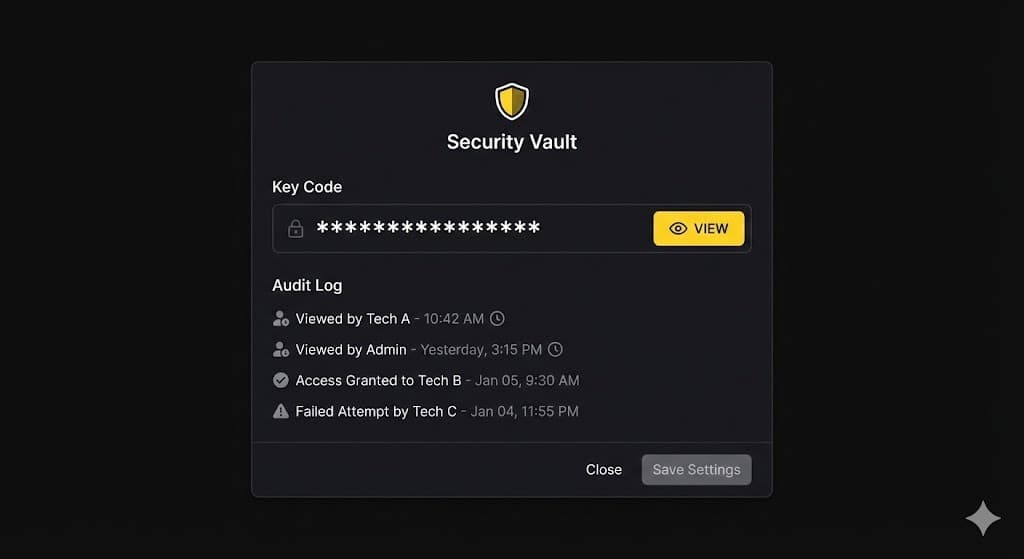
Example secure key code vault and access logs (conceptual mockup only).
Automotive Workflows
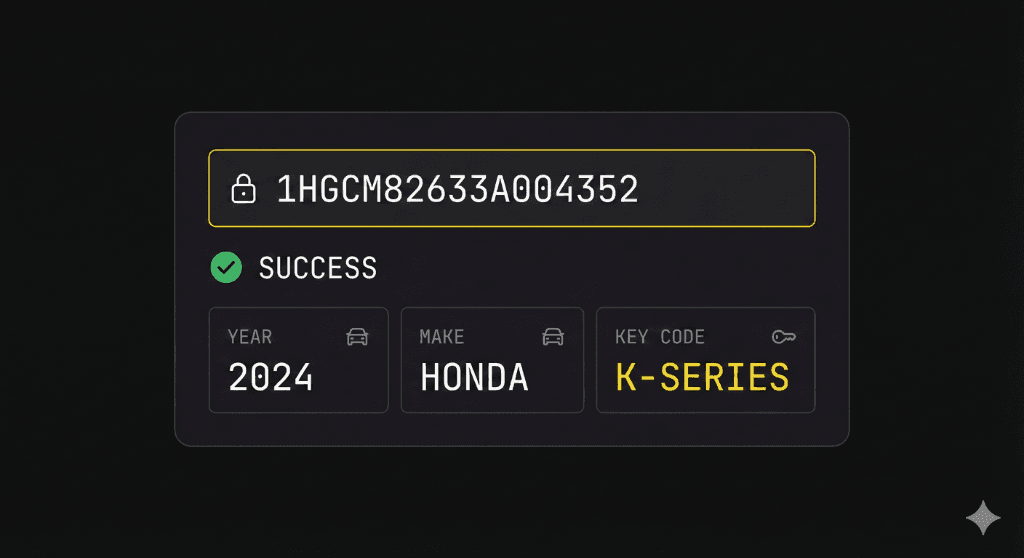
Example secure job-record interface (conceptual mockup only).
Automotive security requires logging structured vehicle specifications—including VIN, Year, Make, Model, and transponder chip type. Logically organizing these fields prevents transcription errors and speeds up key originations.
Locksmith Inventory
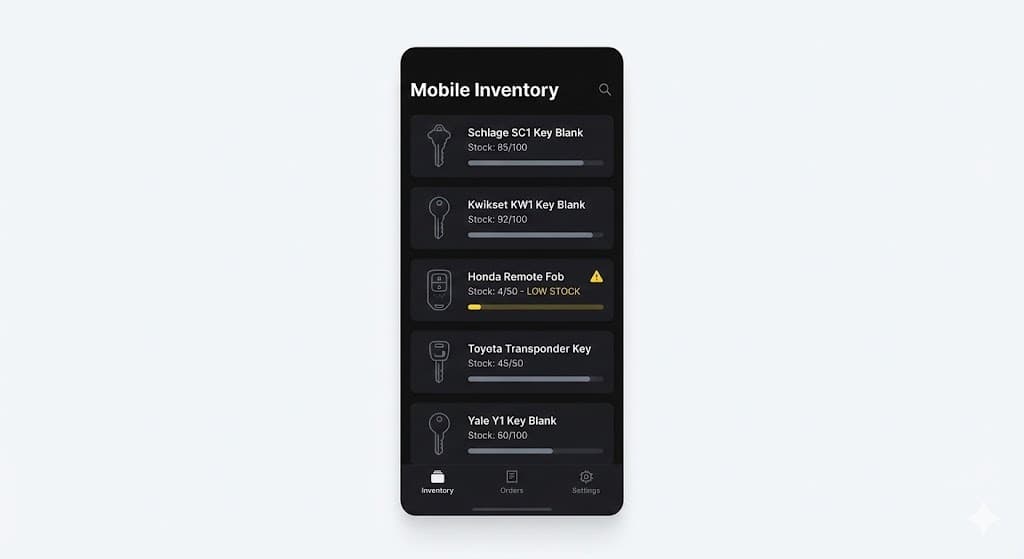
Illustrative mobile inventory workflow (conceptual mockup only).
Unlike typical trade services that track general parts, locksmiths maintain hundreds of distinct SKUs for key blanks, transponder heads, smart remotes, and pinning components. Granular stock tracking at the individual van level helps prevent dispatching technicians to jobs without matching parts.
Sample Locksmith Van Inventory Template
Mobile security vehicles carry extensive blank and cylinder stocks. The spreadsheet below represents a conceptual inventory template for fleet auditing purposes.
| SKU / Item Code | Category | Min Stock | Current Qty |
|---|---|---|---|
| BLANK-SC1 | Key Blank (Schlage SC1) | 150 | 184 |
| BLANK-KW1 | Key Blank (Kwikset KW1) | 150 | 142 (Alert) |
| CYL-MORTISE-1 | Mortise Cylinder (1-1/8") | 10 | 12 |
| FOB-FORD-3B | Ford 3-Button Remote Fob | 5 | 3 (Alert) |
Hidden Costs Buyers Overlook
When comparing locksmith software quotes, the headline monthly price rarely reflects the true total cost of ownership. Keep an eye out for these hidden expenses:
- Credit Card Processing Markup: Many platforms lock you into their proprietary merchant account, charging 3% or more per swipe and restricting external gateways.
- SMS and Call Masking Gateways: Automated customer text alerts and technician phone masking frequently incur usage charges per message or minute.
- Technician Seat Upgrades: A low starting price might cover only 1 dispatcher and 1 technician. Adding additional vans can raise the price significantly.
Common Questions Locksmiths Ask Before Buying
Based on search data and discussions across locksmith community channels, these are the most common questions business owners raise when evaluating new platforms:
Should I replace InstaCode or HPC CodeSource?
No. Key-code lookup engines serve specialized mathematical conversion needs. A Field Service Management (FSM) platform complements these tools by logging the resulting bitting values into customer history records, but does not calculate physical key bitting depths directly.
Is Jobber or Housecall Pro good for locksmiths?
These platforms are highly regarded general FSM systems with strong scheduling features. However, they lack dedicated fields for VIN, key blank SKUs, and secure key-code vaults, forcing locksmiths to rely on custom fields or unstructured text notes.
Can locksmith software track key inventory?
Yes, provided the software supports granular stock tracking. The key is finding a system that logs individual keyway blanks and transponder SKUs at the truck/van level, deducting quantities as parts are invoiced in the field.
What's the biggest mistake when switching software?
Failing to verify the data portability of custom fields. If your vehicle specifications, bitting histories, and commercial door lists are not exported in a clean CSV or JSON format, they can easily get lost or scrambled during the migration process.
Can I keep my customer history?
Usually yes, but it depends on the target database format. You should ask vendors if they provide data import templates and dry-run tests before committing to a switch, ensuring key codes and addresses map correctly.
How long does implementation take?
For a solo operator, setup takes less than an hour. For a commercial provider with master key systems, fleet vehicles, and QuickBooks synchronization, full rollout and training typically require two to four weeks.
Industry Realities: Licensing, Transparency, and Consumer Trust
Local locksmith operators face a persistent public relations challenge: the prevalence of unlicensed, bait-and-switch "locksmith scams" that overcharge consumers in vulnerable emergency lockout situations. Running a successful, sustainable locksmith business requires actively combatting this perception through transparency.
Modern business management software plays a central role in establishing trust and consumer confidence:
- Upfront Digital Estimates: Pushing a clear, structured quote to a customer's phone *before* the technician begins work eliminates the verbal bait-and-switch pattern. This provides clear pricing documentation matching local rates.
- Technician Identity Verification: Sending automated dispatch notifications containing the technician's name, verified photo, and active state locksmith license registration details provides immediate peace of mind to stranded motorists or residential clients.
- Secure Customer Authorization Logs: Documenting the caller's ID and vehicle registration before originating keys protects the locksmith business from liability while demonstrating strict compliance to security standards (such as ALOA and local licensing board regulations).
Want to see how locksmith-specific software handles secure key data, mobile inventory, and dispatch in one system?
Specialized Locksmith Industry Workflows
Different niche verticals within the locksmith trade require tailored software approaches.
How to Evaluate Locksmith Software
When selecting a platform, consider whether the software provides a complete, interconnected suite. A unified system prevents data silos and duplicate entry across these core components:
Dispatching
Intelligent, proximity-based routing.
Customer CRM
Service histories and property profiles.
Mobile App
Mobile technician field application.
Invoicing
Digital estimates and instant payments.
Inventory Management
Track key blanks and mobile truck stock.
Commercial Workflows
Master key and B2B account management.
Editorial Methodology & Standards
Unlokt is committed to providing accurate and objective evaluations of security industry technology. This guide is curated and maintained by the Unlokt Editorial Team. Our recommendations are formulated based on analysis of trade workflow requirements, feedback from locksmith business operators migrating from generalist platforms, and comparison of pricing and features across five leading field service tools.
This content complies with standard industry documentation guidelines (such as the ALOA security protocol recommendations). All product information is updated periodically to ensure ongoing technical accuracy.
See how Unlokt works for modern locksmith operations.
Frequently Asked Questions
Locksmith software refers to specialized field service management tools designed specifically for security workflows, such as key code storage, VIN decoding, and master key system tracking, alongside standard dispatch and invoicing.
Generic FSM tools lack critical security features like secure key code storage, automotive VIN integration, and regulatory compliance logs required by professional locksmiths.
Yes, modern locksmith platforms like Unlokt sync invoices and payments directly to QuickBooks Online to streamline accounting without double entry.
The best software depends on your focus. For general scheduling, tools like Jobber work well. For dedicated locksmith operations handling key blanks, auto lockouts, and commercial hardware, a specialized platform like Unlokt is recommended.
Yes, comprehensive platforms include inventory management designed for high-volume parts like key blanks, fobs, and commercial hardware, tracking them directly from warehouse to technician's van.
Yes, dispatch software provides real-time proximity mapping, skill-based job assignment, and a dedicated mobile app for field technicians to view assignments and update job statuses.
Even a single-van operation benefits from automated invoicing, secure key code storage, and professional digital estimates. It reduces back-office paperwork, allowing the owner to focus on billable work.
Commercial locksmiths require platforms that can handle multi-site properties, complex master key system charts, recurring service contracts, and robust B2B invoicing workflows.
Reviewed under the Unlokt Research & Editorial Standards.